Class WPainter
The painter class provides a vector graphics interface for painting. It needs to be used in
conjunction with a WPaintDevice, onto which it paints. To start painting on a device,
either pass the device through the constructor, or use begin().
A typical use is to instantiate a WPainter from within a specialized WPaintedWidget#paintEvent() implementation,
to paint on the given paint device, but you can also use a painter to paint directly to a
particular paint device of choice, for example to create SVG, PDF or PNG images (as resources).
The painter maintains state such as the current pen, brush, font, getShadow(), transformation and
clipping settings (see setClipping() and setClipPath()). A particular state can be saved
using save() and later restored using restore().
The painting system distinguishes between device coordinates, logical coordinates, and local
coordinates. The device coordinate system ranges from (0, 0) in the top left corner of the
device, to (device.width().toPixels(), device.height().toPixels()) for the bottom right corner.
The logical coordinate system defines a coordinate system that may be chosen independent of the
geometry of the device, which is convenient to make abstraction of the actual device size.
Finally, the current local coordinate system may be different from the logical coordinate system
because of a transformation set (using translate(), rotate(), and scale()). Initially, the local coordinate system coincides with the logical coordinate system,
which coincides with the device coordinate system.
The device coordinates are defined in terms of pixels. Even though most underlying devices are
actual vector graphics formats, when used in conjunction with a WPaintedWidget, these
vector graphics are rendered by the browser onto a pixel-based canvas (like the rest of the
user-interface). The coordinates are defined such that integer values correspond to an imaginary
raster which separates the individual pixels, as in the figure below.
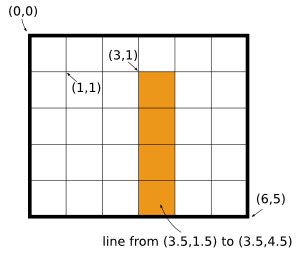
The device coordinate system for a 6x5 pixel device
As a consequence, to avoid anti-aliasing effects when drawing straight lines of width one pixel, you will need to use vertices that indicate the middle of a pixel to get a crisp one-pixel wide line, as in the example figure.
By setting a getViewPort() and a getWindow(), a viewPort transformation is defined which maps logical coordinates onto device
coordinates. By changing the world transformation (using setWorldTransform(), or translate(), rotate(),
scale() operations), it is defined how current local
coordinates map onto logical coordinates.
The painter provides support for clipping using an arbitrary path, but
not that the WVmlImage paint device only has limited support for clipping.
- See Also:
-
Nested Class Summary
Nested Classes -
Constructor Summary
ConstructorsConstructorDescriptionWPainter()Default constructor.WPainter(WPaintDevice device) Creates a painter on a given paint device. -
Method Summary
Modifier and TypeMethodDescriptionbooleanbegin(WPaintDevice device) Begins painting on a paint device.voiddrawArc(double x, double y, double width, double height, int startAngle, int spanAngle) Draws an arc.voidDraws an arc.voiddrawChord(double x, double y, double width, double height, int startAngle, int spanAngle) Draws a chord.voidDraws a chord.voiddrawEllipse(double x, double y, double width, double height) Draws an ellipse.voiddrawEllipse(WRectF rectangle) Draws an ellipse.final voiddrawImage(double x, double y, WPainter.Image image) Draws part of an image.final voiddrawImage(double x, double y, WPainter.Image image, double sx) Draws part of an image.final voiddrawImage(double x, double y, WPainter.Image image, double sx, double sy) Draws part of an image.final voiddrawImage(double x, double y, WPainter.Image image, double sx, double sy, double sw) Draws part of an image.voiddrawImage(double x, double y, WPainter.Image image, double sx, double sy, double sw, double sh) Draws part of an image.voiddrawImage(WPointF point, WPainter.Image image) Draws an image.voiddrawImage(WPointF point, WPainter.Image image, WRectF sourceRect) Draws part of an image.voiddrawImage(WRectF rect, WPainter.Image image) Draws an image inside a rectangle.voiddrawImage(WRectF rect, WPainter.Image image, WRectF sourceRect) Draws part of an image inside a rectangle.voiddrawLine(double x1, double y1, double x2, double y2) Draws a line.voidDraws a line.voidDraws a line.voidDraws an array of lines.voidDraws an array of lines.voiddrawLinesLine(List<WLineF> lines) Draws an array of lines.voiddrawLinesPoint(List<WPointF> pointPairs) Draws an array of lines.voiddrawPath(WPainterPath path) Draws a (complex) path.voiddrawPie(double x, double y, double width, double height, int startAngle, int spanAngle) Draws a pie.voidDraws a pie.voiddrawPoint(double x, double y) Draws a point.voidDraws a point.voiddrawPoints(WPointF[] points, int pointCount) Draws a number of points.voiddrawPolygon(WPointF[] points, int pointCount) Draws a polygon.voiddrawPolyline(WPointF[] points, int pointCount) Draws a polyline.voiddrawRect(double x, double y, double width, double height) Draws a rectangle.voidDraws a rectangle.voidDraws a number of rectangles.voidDraws a number of rectangles.final voiddrawStencilAlongPath(WPainterPath stencil, WPainterPath path) Draws aWPainterPathon every anchor point of a path.voiddrawStencilAlongPath(WPainterPath stencil, WPainterPath path, boolean softClipping) Draws aWPainterPathon every anchor point of a path.voiddrawText(double x, double y, double width, double height, EnumSet<AlignmentFlag> alignmentFlags, TextFlag textFlag, WTextF text) Draws text.voiddrawText(double x, double y, double width, double height, EnumSet<AlignmentFlag> alignmentFlags, TextFlag textFlag, CharSequence text) Draws text.voiddrawText(double x, double y, double width, double height, EnumSet<AlignmentFlag> flags, WTextF text) Draws text.voiddrawText(double x, double y, double width, double height, EnumSet<AlignmentFlag> flags, CharSequence text) Draws text.final voidDraws text.voiddrawText(WRectF rectangle, EnumSet<AlignmentFlag> alignmentFlags, TextFlag textFlag, WTextF text, WPointF clipPoint) Draws text.final voiddrawText(WRectF rect, EnumSet<AlignmentFlag> alignmentFlags, TextFlag textFlag, CharSequence text) Draws text.voiddrawText(WRectF rect, EnumSet<AlignmentFlag> alignmentFlags, TextFlag textFlag, CharSequence text, WPointF clipPoint) Draws text.voiddrawText(WRectF rectangle, EnumSet<AlignmentFlag> flags, WTextF text) Draws text.voiddrawText(WRectF rectangle, EnumSet<AlignmentFlag> flags, CharSequence text) Draws text.voiddrawTextOnPath(WRectF rect, EnumSet<AlignmentFlag> alignmentFlags, List<WString> text, WTransform transform, WPainterPath path, double angle, double lineHeight, boolean softClipping) voiddrawWTextFOnPath(WRectF rect, EnumSet<AlignmentFlag> alignmentFlags, List<WTextF> text, WTransform transform, WPainterPath path, double angle, double lineHeight, boolean softClipping) booleanend()Ends painting.voidfillPath(WPainterPath path, WBrush b) Fills a (complex) path.voidFills a rectangle.voidFills a rectangle.getBrush()Returns the current brush.Returns the clip path.Returns the combined transformation matrix.Returns the device on which this painter is active (or 0 if not active).getFont()Returns the current font.getPen()Returns the current pen.Returns the current render hints.Returns the current shadow effect.Returns the viewport.Returns the current window.Returns the current world transformation matrix.booleanReturns whether clipping is enabled.booleanisActive()Returns whether this painter is active on a paint device.voidResets the current transformation.voidrestore()Returns the last save state.voidrotate(double angle) Rotates the logical coordinate system.voidsave()Saves the current state.voidscale(double sx, double sy) Scales the logical coordinate system.voidSets the fill style.voidsetClipPath(WPainterPath clipPath) Sets the clip path.voidsetClipping(boolean enable) Enables or disables clipping.voidSets the font.voidSets the pen.final voidsetRenderHint(RenderHint hint) Sets a render hint.voidsetRenderHint(RenderHint hint, boolean on) Sets a render hint.voidSets a shadow effect.voidsetViewPort(double x, double y, double width, double height) Sets the viewport.voidsetViewPort(WRectF viewPort) Sets the viewport.voidsetWindow(double x, double y, double width, double height) Sets the window.voidSets the window.final voidsetWorldTransform(WTransform matrix) Sets a transformation for the logical coordinate system.voidsetWorldTransform(WTransform matrix, boolean combine) Sets a transformation for the logical coordinate system.voidstrokePath(WPainterPath path, WPen p) Strokes a path.voidtranslate(double dx, double dy) Translates the origin of the logical coordinate system.voidTranslates the origin of the logical coordinate system.
-
Constructor Details
-
WPainter
public WPainter()Default constructor.Before painting, you must invoke
begin()on a paint device.- See Also:
-
WPainter
Creates a painter on a given paint device.
-
-
Method Details
-
begin
Begins painting on a paint device.- See Also:
-
isActive
public boolean isActive()Returns whether this painter is active on a paint device.- See Also:
-
end
public boolean end()Ends painting. -
getDevice
Returns the device on which this painter is active (or 0 if not active).- See Also:
-
setRenderHint
Sets a render hint.Renderers may ignore particular hints for which they have no support.
-
setRenderHint
Sets a render hint. -
getRenderHints
Returns the current render hints.Returns the logical OR of render hints currently set.
- See Also:
-
drawArc
Draws an arc.Draws an arc using the current pen, and fills using the current brush.
The arc is defined as a segment from an ellipse, which fits in the rectangle. The segment starts at
startAngle, and spans an angle given byspanAngle. These angles have as unit 1/16th of a degree, and are measured counter-clockwise starting from the 3 o'clock position.- See Also:
-
drawArc
public void drawArc(double x, double y, double width, double height, int startAngle, int spanAngle) Draws an arc.This is an overloaded method for convenience.
- See Also:
-
drawChord
Draws a chord.Draws an arc using the current pen, and connects start and end point with a line. The area is filled using the current brush.
The arc is defined as a segment from an ellipse, which fits in the rectangle. The segment starts at
startAngle, and spans an angle given byspanAngle. These angles have as unit 1/16th of a degree, and are measured counter-clockwise starting at 3 o'clock.- See Also:
-
drawChord
public void drawChord(double x, double y, double width, double height, int startAngle, int spanAngle) Draws a chord.This is an overloaded method for convenience.
- See Also:
-
drawEllipse
Draws an ellipse.Draws an ellipse using the current pen and fills it using the current brush.
The ellipse is defined as being bounded by the
rectangle.- See Also:
-
drawEllipse
public void drawEllipse(double x, double y, double width, double height) Draws an ellipse.This is an overloaded method for convenience.
- See Also:
-
drawImage
Draws an image.Draws the
imageso that the top left corner corresponds topoint.This is an overloaded method provided for convenience.
-
drawImage
Draws part of an image.Draws the
sourceRectrectangle from an image to the locationpoint.This is an overloaded method provided for convenience.
-
drawImage
Draws an image inside a rectangle.Draws the image inside
rect(If necessary, the image is scaled to fit into the rectangle).This is an overloaded method provided for convenience.
-
drawImage
Draws part of an image inside a rectangle.Draws the
sourceRectrectangle from an image insiderect(If necessary, the image is scaled to fit into the rectangle). -
drawImage
public void drawImage(double x, double y, WPainter.Image image, double sx, double sy, double sw, double sh) Draws part of an image.Draws the
sourceRectrectangle with top left corner (sx, sy) and size sw xshfrom an image to the location (x,y). -
drawImage
Draws part of an image. -
drawImage
Draws part of an image. -
drawImage
Draws part of an image. -
drawImage
public final void drawImage(double x, double y, WPainter.Image image, double sx, double sy, double sw) Draws part of an image. -
drawLine
Draws a line.Draws a line using the current pen.
- See Also:
-
drawLine
Draws a line.Draws a line defined by two points.
- See Also:
-
drawLine
public void drawLine(double x1, double y1, double x2, double y2) Draws a line.Draws a line defined by two points.
- See Also:
-
drawLines
Draws an array of lines.Draws the
lineCountfirst lines from the given array of lines. -
drawLines
Draws an array of lines.Draws
lineCountlines, where each line is specified using a begin and end point that are read from an array. Thus, the pointPairs array must have at least 2*lineCountpoints. -
drawLinesLine
Draws an array of lines.Draws the lines given in the vector.
-
drawLinesPoint
Draws an array of lines.Draws a number of lines that are specified by pairs of begin- and endpoints. The vector should hold a number of points that is a multiple of two.
-
drawPath
Draws a (complex) path.Draws and fills the given path using the current pen and brush.
- See Also:
-
drawStencilAlongPath
Draws aWPainterPathon every anchor point of a path.Draws the first
WPainterPathon every anchor point of the second path. When rendering to an HTML canvas, this will cause far less JavaScript to be generated than separate calls to drawPath. Also, it's possible for either path to beJavaScript boundthrough, e.g. applying a JavaScript boundWTransformwithout deforming the other path. This is used by WCartesianChart to draw data series markers that don't change size when zooming in.If one of the anchor points of the path is outside of the current clipping area, the stencil will be drawn if softClipping is disabled, and it will not be drawn when softClipping is enabled.
-
drawStencilAlongPath
Draws aWPainterPathon every anchor point of a path. -
drawPie
Draws a pie.Draws an arc using the current pen, and connects start and end point with the center of the corresponding ellipse. The area is filled using the current brush.
The arc is defined as a segment from an ellipse, which fits in the rectangle. The segment starts at
startAngle, and spans an angle given byspanAngle. These angles have as unit 1/16th of a degree, and are measured counter-clockwise starting at 3 o'clock.- See Also:
-
drawPie
public void drawPie(double x, double y, double width, double height, int startAngle, int spanAngle) Draws a pie.This is an overloaded method for convenience.
- See Also:
-
drawPoint
Draws a point.Draws a single point using the current pen. This is implemented by drawing a very short line, centered around the given
position. To get the result of a single point, you should use a pen with a Wt::PenCapStyle::Square or Wt::PenCapStyle::Round pen cap style.- See Also:
-
drawPoint
public void drawPoint(double x, double y) Draws a point.This is an overloaded method for convenience.
- See Also:
-
drawPoints
Draws a number of points.Draws the
pointCountfirst points from the given array of points.- See Also:
-
drawPolygon
Draws a polygon.Draws a polygon that is specified by a list of points, using the current pen. The polygon is closed by connecting the last point with the first point, and filled using the current brush.
- See Also:
-
drawPolyline
Draws a polyline.Draws a polyline that is specified by a list of points, using the current pen.
- See Also:
-
drawRect
Draws a rectangle.Draws and fills a rectangle using the current pen and brush.
- See Also:
-
drawRect
public void drawRect(double x, double y, double width, double height) Draws a rectangle.This is an overloaded method for convenience.
- See Also:
-
drawRects
Draws a number of rectangles.Draws and fills the
rectCountfirst rectangles from the given array, using the current pen and brush.- See Also:
-
drawRects
Draws a number of rectangles.Draws and fills a list of rectangles using the current pen and brush.
- See Also:
-
drawText
public void drawText(WRectF rectangle, EnumSet<AlignmentFlag> alignmentFlags, TextFlag textFlag, WTextF text, WPointF clipPoint) Draws text.Draws text using inside the rectangle, using the current font. The text is aligned inside the rectangle following alignment indications given in
flags. The text is drawn using the current transformation, pen color (getPen()) and font settings (getFont()).AlignmentFlags is the logical OR of a horizontal and vertical alignment.
Orientation.Horizontalalignment may be one ofAlignmentFlag.Left,AlignmentFlag.Center, orAlignmentFlag.Right.Orientation.Verticalalignment is one ofAlignmentFlag.Top,AlignmentFlag.MiddleorAlignmentFlag.Bottom.TextFlag determines how the text is rendered in the rectangle. Text can be rendered on one line or by wrapping the words within the rectangle.
If a clipPoint is provided, the text will not be drawn if the point is outside of the
getClipPath().Note: If the clip path is not a polygon, i.e. it has rounded segments in it, an approximation will be used instead by having the polygon pass through the control points, and the begin and end point of arcs.
Note: HtmlCanvas: on older browsers implementing Html5 canvas, text will be rendered horizontally (unaffected by rotation and unaffected by the scaling component of the transformation matrix). In that case, text is overlayed on top of painted shapes (in DOM div's), and is not covered by shapes that are painted after the text. Use the SVG and VML renderers (WPaintedWidget::inlineSvgVml) for the most accurate font rendering. Native HTML5 text rendering is supported on Firefox3+, Chrome2+ and Safari4+.
Note:
TextFlag.WordWrap: using theTextFlag.WordWrapTextFlag is currently only supported by the SVG backend. The code generated by the SVG backend uses features currently only supported by Inkscape. Inkscape currently supports onlySide.Topvertical alignments. -
drawText
public final void drawText(WRectF rectangle, EnumSet<AlignmentFlag> alignmentFlags, TextFlag textFlag, WTextF text) Draws text.Calls
drawText(rectangle, alignmentFlags, textFlag, text, (WPointF)null) -
drawWTextFOnPath
public void drawWTextFOnPath(WRectF rect, EnumSet<AlignmentFlag> alignmentFlags, List<WTextF> text, WTransform transform, WPainterPath path, double angle, double lineHeight, boolean softClipping) -
drawTextOnPath
public void drawTextOnPath(WRectF rect, EnumSet<AlignmentFlag> alignmentFlags, List<WString> text, WTransform transform, WPainterPath path, double angle, double lineHeight, boolean softClipping) -
drawText
Draws text.This is an overloaded method for convenience, it will render text on a single line.
-
drawText
public void drawText(double x, double y, double width, double height, EnumSet<AlignmentFlag> flags, WTextF text) Draws text.This is an overloaded method for convenience.
- See Also:
-
drawText
public void drawText(double x, double y, double width, double height, EnumSet<AlignmentFlag> alignmentFlags, TextFlag textFlag, WTextF text) Draws text.This is an overloaded method for convenience.
- See Also:
-
drawText
public void drawText(WRectF rect, EnumSet<AlignmentFlag> alignmentFlags, TextFlag textFlag, CharSequence text, WPointF clipPoint) Draws text. -
drawText
public final void drawText(WRectF rect, EnumSet<AlignmentFlag> alignmentFlags, TextFlag textFlag, CharSequence text) Draws text.Calls
drawText(rect, alignmentFlags, textFlag, text, (WPointF)null) -
drawText
Draws text. -
drawText
public void drawText(double x, double y, double width, double height, EnumSet<AlignmentFlag> flags, CharSequence text) Draws text. -
drawText
public void drawText(double x, double y, double width, double height, EnumSet<AlignmentFlag> alignmentFlags, TextFlag textFlag, CharSequence text) Draws text. -
fillPath
Fills a (complex) path.Like
drawPath(), but does not stroke the path, and fills the path with the givenbrush.- See Also:
-
fillRect
Fills a rectangle.Like
drawRect(), but does not stroke the rect, and fills the rect with the givenbrush.- See Also:
-
fillRect
Fills a rectangle.This is an overloaded method for convenience.
- See Also:
-
strokePath
Strokes a path.Like
drawPath(), but does not fill the path, and strokes the path with the givenpen.- See Also:
-
setShadow
Sets a shadow effect.The shadow effect is applied to all things drawn (paths, text and images).
Note: With the VML backend (IE), the shadow is not applied to images, and the shadow color is always black; only the opacity (alpha) channel is taken into account.
-
getShadow
Returns the current shadow effect.- See Also:
-
setBrush
Sets the fill style.Changes the fills style for subsequent draw operations.
- See Also:
-
setFont
Sets the font.Changes the font for subsequent text rendering. Note that only font sizes that are defined as an explicit size (see
FontSize.FixedSize) will render correctly in all devices (SVG, VML, and HtmlCanvas).The list of fonts that will render correctly with VML (on IE<9) are limited to the following: http://www.ampsoft.net/webdesign-l/WindowsMacFonts.html
Careful, for a font family that contains a space, you need to add quotes, to
WFont#setFamily()e.g.WFont mono; mono.setFamily(FontFamily::Monospace, "'Courier New'"); mono.setSize(18);- See Also:
-
setPen
Sets the pen.Changes the pen used for stroking subsequent draw operations.
- See Also:
-
getBrush
Returns the current brush.Returns the brush style that is currently used for filling.
- See Also:
-
getFont
Returns the current font.Returns the font that is currently used for rendering text. The default font is a 10pt sans serif font.
- See Also:
-
getPen
Returns the current pen.Returns the pen that is currently used for stroking.
- See Also:
-
setClipping
public void setClipping(boolean enable) Enables or disables clipping.Enables are disables clipping for subsequent operations using the current clip path set using
setClipPath().Note: Clipping support is limited for the VML renderer. Only clipping with a rectangle is supported for the VML renderer (see
addRect()). The rectangle must, after applying the combined transformation system, be aligned with the window.- See Also:
-
hasClipping
public boolean hasClipping()Returns whether clipping is enabled.Note: Clipping support is limited for the VML renderer.
- See Also:
-
setClipPath
Sets the clip path.Sets the path that is used for clipping subsequent drawing operations. The clip path is only used when clipping is enabled using
setClipping(). The path is specified in local coordinates.Note: Clipping support is limited for the VML renderer.
- See Also:
-
getClipPath
Returns the clip path.The clip path is returned as it was defined: in the local coordinates at time of definition.
- See Also:
-
resetTransform
public void resetTransform()Resets the current transformation.Resets the current transformation to the identity transformation matrix, so that the logical coordinate system coincides with the device coordinate system.
-
rotate
public void rotate(double angle) Rotates the logical coordinate system.Rotates the logical coordinate system around its origin. The
angleis specified in degrees, and positive values are clock-wise.- See Also:
-
scale
public void scale(double sx, double sy) Scales the logical coordinate system.Scales the logical coordinate system around its origin, by a factor in the X and Y directions.
- See Also:
-
translate
Translates the origin of the logical coordinate system.Translates the origin of the logical coordinate system to a new location relative to the current logical coordinate system.
- See Also:
-
translate
public void translate(double dx, double dy) Translates the origin of the logical coordinate system.Translates the origin of the logical coordinate system to a new location relative to the logical coordinate system.
- See Also:
-
setWorldTransform
Sets a transformation for the logical coordinate system.Sets a new transformation which transforms logical coordinates to device coordinates. When
combineistrue, the transformation is combined with the current world transformation matrix.- See Also:
-
setWorldTransform
Sets a transformation for the logical coordinate system. -
getWorldTransform
Returns the current world transformation matrix.- See Also:
-
save
public void save()Saves the current state.A copy of the current state is saved on a stack. This state will may later be restored by popping this state from the stack using
restore().The state that is saved is the current
pen,brush,font,getShadow(),transformationand clipping settings (seesetClipping()andsetClipPath()).- See Also:
-
restore
public void restore()Returns the last save state.Pops the last saved state from the state stack.
- See Also:
-
setViewPort
Sets the viewport.Selects the part of the device that will correspond to the logical coordinate system.
By default, the viewport spans the entire device: it is the rectangle (0, 0) to (device.width(), device.height()). The window defines how the viewport is mapped to logical coordinates.
- See Also:
-
setViewPort
public void setViewPort(double x, double y, double width, double height) Sets the viewport.This is an overloaded method for convenience.
- See Also:
-
getViewPort
Returns the viewport.- See Also:
-
setWindow
Sets the window.Defines the viewport rectangle in logical coordinates, and thus how logical coordinates map onto the viewPort.
By default, is (0, 0) to (device.width(), device.height()). Thus, the default window and viewport leave logical coordinates identical to device coordinates.
- See Also:
-
setWindow
public void setWindow(double x, double y, double width, double height) Sets the window.This is an overloaded method for convenience.
- See Also:
-
getWindow
Returns the current window.- See Also:
-
getCombinedTransform
Returns the combined transformation matrix.Returns the transformation matrix that maps coordinates to device coordinates. It is the combination of the current world transformation (which defines the transformation within the logical coordinate system) and the window/viewport transformation (which transforms logical coordinates to device coordinates).
- See Also:
-