Class WDialog
- Direct Known Subclasses:
PasswordPromptDialog,WMessageBox
By default, the dialog is modal. A modal window blocks the user interface, and does not allow the user to interact with any other part of the user interface until the dialog is closed (this is enforced at the server side, so you may rely on this behavior).
A modal dialog can be instantiated synchronously or asynchronously. A non-modal dialog can only be instantiated asynchronously.
When using a dialog asynchronously, there is no API call that waits for the dialog to be
closed. Then, the usage is similar to instantiating any other widget. The dialog may be closed by
calling accept(), reject() or done() (or connecting a signal to one of these methods). This
will hide the dialog and emit the finished() signal, which you then
can listen for to process the dialog result and delete the dialog. Unlike other widgets, a dialog
does not need to be added to a parent widget, but is hidden by default. You must use the method
WWidget.show() or setHidden() to show the dialog.
The synchronous use of a dialog involves a call to exec() which will block (suspend the thread) until the dialog window is closed, and return the
dialog result. Events within dialog are handled using a so-called recursive event loop.
Typically, an OK button will be connected to accept(), and in some cases
a StandardButton.Cancel button to reject(). This solution has
the drawback that it is not scalable to many concurrent sessions, since for every session with a
recursive event loop, a thread is locked until exec()
returns. A thread that is locked by a recursive event loop cannot be used to process requests
from another sessions. When all threads in the threadpool are locked in recursive event loops,
the server will be unresponsive to requests from any other session. In practical terms, this
means you must not use exec(), unless your application
will never be used by more concurrent users than the amount of threads in your threadpool (like
on some intranets or extranets). Using exec() is not
supported from outside the regular event loop (i.e. when taking a lock on a session using WApplication.getUpdateLock() or by posting an event using WServer::post()). This functionality
is only available on Servlet 3.0 compatible servlet containers. Use setModal() to create a non-modal dialog. A non-modal dialog does
not block the underlying user interface: the user must not first deal with the dialog before
interacting with the rest of the user interface.
Contents for the dialog is defined by adding it to the getContents() widget.
This dialog looks like this (using the default css themes):
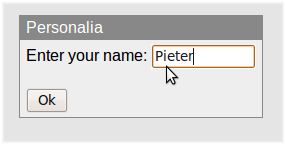
A simple custom dialog (default) | 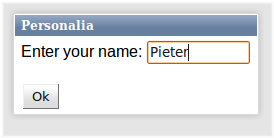
A simple custom dialog (polished) |
Note: For the dialog (or rather, the silkscreen covering the user interface below) to render properly in IE, the "html body" margin is set to 0 (if it wasn't already).
-
Nested Class Summary
Nested classes/interfaces inherited from class eu.webtoolkit.jwt.WObject
WObject.FormData -
Constructor Summary
ConstructorsConstructorDescriptionWDialog()Constructs a new dialog.WDialog(CharSequence windowTitle) Constructs a dialog with a given window title. -
Method Summary
Modifier and TypeMethodDescriptionvoidaccept()Closes the dialog, with result is Accepted.voiddone(DialogCode result) Stops the dialog.Event signal emitted when enter was pressed.Event signal emitted when escape was pressed.final DialogCodeexec()Executes the dialog in a recursive event loop.exec(WAnimation animation) Executes the dialog in a recursive event loop.finished()Signal emitted when the dialog is closed.Returns the dialog contents container.Returns the dialog footer container.Returns the result that was set for this dialog.Returns the dialog title bar container.Returns the dialog window title.booleanReturns whether the dialog can be closed.booleanisModal()Returns whether the dialog is modal.booleanReturns whether the dialog can be moved.booleanReturns whether the dialog has a resize handle.booleanReturns whether the title bar is enabled.Event signal emitted when a "character" was entered.Event signal emitted when a keyboard key is pushed down.Event signal emitted when a keyboard key is released.moved()Signal emitted when the dialog is being moved by the user.protected voidvoidSet the position of the widget at the mouse position.voidpositionAt(WWidget widget, Orientation orientation) Positions a widget next to another widget.voidRaises this dialog to be the top-most dialog.voidreject()Closes the dialog, with result is Rejected.final voidLets pressing the escape key reject the dialog.voidrejectWhenEscapePressed(boolean enable) Lets pressing the escape key reject the dialog.voidremove()Deletes a dialog.protected voidrender(EnumSet<RenderFlag> flags) Renders the widget.resized()Signal emitted when the dialog is being resized by the user.voidsetAutoFocus(boolean enable) Set focus on the first widget in the dialog.voidsetClosable(boolean closable) Adds a close button to the titlebar.voidsetHidden(boolean hidden, WAnimation animation) Hides or shows the widget.voidsetMaximumSize(WLength width, WLength height) Sets a maximum size.voidsetMinimumSize(WLength width, WLength height) Sets a minimum size.voidsetModal(boolean modal) Sets whether the dialog is modal.voidsetMovable(boolean movable) Allows the dialog to be moved.voidsetResizable(boolean resizable) Adds a resize handle to the dialog.voidsetTitleBarEnabled(boolean enable) Enables or disables the title bar.voidsetWindowTitle(CharSequence windowTitle) Sets the dialog window title.Event signal emitted when a finger is removed from the screen.Event signal emitted when a finger, which is already placed on the screen, is moved across the screen.Event signal emitted when a finger is placed on the screen.Methods inherited from class eu.webtoolkit.jwt.WPopupWidget
getAnchorWidget, getAutoHideDelay, getOrientation, hidden, isTransient, setAnchorWidget, setAnchorWidget, setTransient, setTransient, shownMethods inherited from class eu.webtoolkit.jwt.WCompositeWidget
addStyleClass, boxBorder, boxPadding, callJavaScriptMember, doJavaScript, enableAjax, find, findById, getAttributeValue, getBaseZIndex, getChildren, getClearSides, getDecorationStyle, getFloatSide, getHeight, getId, getImplementation, getJavaScriptMember, getLineHeight, getMargin, getMaximumHeight, getMaximumWidth, getMinimumHeight, getMinimumWidth, getObjectName, getOffset, getPositionScheme, getScrollVisibilityMargin, getStyleClass, getTabIndex, getTakeImplementation, getToolTip, getVerticalAlignment, getVerticalAlignmentLength, getWidth, hasFocus, hasStyleClass, isCanReceiveFocus, isDisabled, isEnabled, isHidden, isHiddenKeepsGeometry, isInline, isLoaded, isPopup, isScrollVisibilityEnabled, isScrollVisible, isSetFirstFocus, isThemeStyleEnabled, isVisible, load, propagateSetEnabled, propagateSetVisible, refresh, removeStyleClass, removeWidget, resize, scrollVisibilityChanged, setAttributeValue, setCanReceiveFocus, setClearSides, setDecorationStyle, setDeferredToolTip, setDisabled, setFloatSide, setFocus, setHiddenKeepsGeometry, setId, setImplementation, setInline, setJavaScriptMember, setLineHeight, setMargin, setObjectName, setOffsets, setPopup, setPositionScheme, setScrollVisibilityEnabled, setScrollVisibilityMargin, setSelectable, setStyleClass, setTabIndex, setThemeStyleEnabled, setToolTip, setVerticalAlignmentMethods inherited from class eu.webtoolkit.jwt.WWidget
acceptDrops, acceptDrops, addCssRule, addCssRule, addJSignal, addStyleClass, animateHide, animateShow, createJavaScript, disable, dropEvent, enable, getDropTouch, getJsRef, getParent, hide, htmlText, isExposed, isGlobalWidget, isLayoutSizeAware, isRendered, layoutSizeChanged, needsRerender, positionAt, removeFromParent, removeStyleClass, render, resize, scheduleRender, scheduleRender, scheduleRender, setClearSides, setDeferredToolTip, setFocus, setHeight, setHidden, setLayoutSizeAware, setMargin, setMargin, setMargin, setMargin, setMargin, setOffsets, setOffsets, setOffsets, setOffsets, setOffsets, setToolTip, setVerticalAlignment, setWidth, show, stopAcceptDrops, toggleStyleClass, toggleStyleClass, trMethods inherited from class eu.webtoolkit.jwt.WObject
setFormData
-
Constructor Details
-
WDialog
public WDialog()Constructs a new dialog.Unlike other widgets, the dialog does not require a parent container since it is a top-level widget.
-
WDialog
Constructs a dialog with a given window title.Unlike other widgets, the dialog does not require a parent container since it is a top-level widget.
-
-
Method Details
-
remove
public void remove()Deletes a dialog.- Overrides:
removein classWPopupWidget- See Also:
-
setWindowTitle
Sets the dialog window title.The window title is displayed in the title bar.
- See Also:
-
getWindowTitle
Returns the dialog window title.- See Also:
-
setTitleBarEnabled
public void setTitleBarEnabled(boolean enable) Enables or disables the title bar.The titlebar is enabled by default.
-
isTitleBarEnabled
public boolean isTitleBarEnabled()Returns whether the title bar is enabled.- See Also:
-
getTitleBar
Returns the dialog title bar container.The title bar contains a single text that contains the caption. You may customize the title bar by for example adding other content.
-
getContents
Returns the dialog contents container.Content to the dialog window may be added to this container widget.
-
exec
Executes the dialog in a recursive event loop.Executes the dialog synchronously. This blocks the current thread of execution until one of
done(),accept()orreject()is called.Warning: using
exec()does not scale to many concurrent sessions, since the thread is locked until exec returns, so the entire server will be unresponsive when the thread pool is exhausted.This functionality is only available on Servlet 3.0 compatible servlet containers.
- See Also:
-
exec
Executes the dialog in a recursive event loop.Returns
exec(new WAnimation()) -
done
Stops the dialog.Sets the dialog result, and emits the
finished()signal.- See Also:
-
accept
public void accept()Closes the dialog, with result is Accepted.- See Also:
-
reject
public void reject()Closes the dialog, with result is Rejected.- See Also:
-
rejectWhenEscapePressed
public void rejectWhenEscapePressed(boolean enable) Lets pressing the escape key reject the dialog.Before JWt 3.1.5, pressing escape automatically rejected the dialog. Since 3.1.4 this behaviour is no longer the default since it may interfere with other functionality in the dialog. Use this method to enable this behaviour.
- See Also:
-
rejectWhenEscapePressed
public final void rejectWhenEscapePressed()Lets pressing the escape key reject the dialog. -
finished
Signal emitted when the dialog is closed.- See Also:
-
getResult
Returns the result that was set for this dialog.- See Also:
-
setModal
public void setModal(boolean modal) Sets whether the dialog is modal.A modal dialog will block the underlying user interface. A modal dialog can be shown synchronously or asynchronously. A non-modal dialog can only be shown asynchronously.
By default a dialog is modal.
-
isModal
public boolean isModal()Returns whether the dialog is modal.- See Also:
-
setResizable
public void setResizable(boolean resizable) Adds a resize handle to the dialog.The resize handle is shown in the bottom right corner of the dialog, and allows the user to resize the dialog (but not smaller than the content allows).
This also sets the minimum width and height to
WLength.Autoto use the initial width and height as minimum sizes. You may want to provide other values for minimum width and height to allow the dialog to be reduced in size.The default value is
false. -
isResizable
public boolean isResizable()Returns whether the dialog has a resize handle.- See Also:
-
setMovable
public void setMovable(boolean movable) Allows the dialog to be moved.The dialog can be moved by grabbing the titlebar.
The default value is
true. -
isMovable
public boolean isMovable()Returns whether the dialog can be moved.- See Also:
-
setClosable
public void setClosable(boolean closable) Adds a close button to the titlebar.The close button is shown in the title bar. Clicking the close button will reject the dialog.
-
isClosable
public boolean isClosable()Returns whether the dialog can be closed. -
setAutoFocus
public void setAutoFocus(boolean enable) Set focus on the first widget in the dialog.Autofocus is enabled by default. If a widget inside of this dialog already has focus, the focus will not be changed.
-
setHidden
Description copied from class:WWidgetHides or shows the widget.Hides or show the widget (including all its descendant widgets). When setting
hidden=false, this widget and all descendant widgets that are not hidden will be shown. A widget is only visible if it and all its ancestors in the widget tree are visible, which may be checked usingisVisible().- Overrides:
setHiddenin classWPopupWidget
-
positionAt
Description copied from class:WWidgetPositions a widget next to another widget.Positions this absolutely positioned widget next to another
widget. Both widgets must be visible (including all their ancestors). The current widget is shown automatically if needed.When
orientation=Orientation.Vertical, the widget is displayed below the other widget (or above in case there is not enough room below). It is aligned so that the left edges align (or the right edges if there is not enough room to the right).Conversely, when
orientation=Orientation.Horizontal, the widget is displayed to the right of the other widget (or to the left in case there is not enough room to the right). It is aligned so that the top edges align (or the bottom edges if there is not enough room below).Note: This only works if JavaScript is available.
- Overrides:
positionAtin classWWidget
-
positionAt
Set the position of the widget at the mouse position. -
raiseToFront
public void raiseToFront()Raises this dialog to be the top-most dialog. -
setMinimumSize
Description copied from class:WWidgetSets a minimum size.Specifies a minimum size for this widget, setting CSS
min-widthandmin-heightproperties.The default minimum width and height is 0. The special value
WLength.Autoindicates that the initial width is used as minimum size. ALengthUnit.Percentagesize should not be used, as this is (in virtually all cases) undefined behaviour.When the widget is inserted in a layout manager, then the minimum size will be taken into account.
- Overrides:
setMinimumSizein classWCompositeWidget- See Also:
-
setMaximumSize
Description copied from class:WWidgetSets a maximum size.Specifies a maximum size for this widget, setting CSS
max-widthandmax-heightproperties.The default the maximum width and height are
WLength.Auto, indicating no maximum size. ALengthUnit.Percentagesize should not be used, as this is (in virtually all cases) undefined behaviour.When the widget is a container widget that contains a layout manager, then setting a maximum size will have the effect of letting the size of the container to reflect the preferred size of the contents (rather than constraining the size of the children based on the size of the container), up to the specified maximum size.
- Overrides:
setMaximumSizein classWCompositeWidget- See Also:
-
resized
Signal emitted when the dialog is being resized by the user.The information passed are the new width and height.
- See Also:
-
moved
Signal emitted when the dialog is being moved by the user.The information passed are the new x and y position (relative to the wietdow).
-
keyWentDown
Event signal emitted when a keyboard key is pushed down.The event will be triggered if nothing in the
WDialoghas focus -
keyPressed
Event signal emitted when a "character" was entered.The event will be triggered if nothing in the
WDialoghas focus -
keyWentUp
Event signal emitted when a keyboard key is released.The event will be triggered if nothing in the
WDialoghas focus -
enterPressed
Event signal emitted when enter was pressed.The event will be triggered if nothing in the
WDialoghas focus -
escapePressed
Event signal emitted when escape was pressed.The event will be triggered if nothing in the
WDialoghas focus -
touchStarted
Event signal emitted when a finger is placed on the screen. -
touchEnded
Event signal emitted when a finger is removed from the screen. -
touchMoved
Event signal emitted when a finger, which is already placed on the screen, is moved across the screen. -
render
Description copied from class:WWidgetRenders the widget.This function renders the widget (or an update for the widget), after this has been scheduled using
scheduleRender().The default implementation will render the widget by serializing changes to JavaScript and HTML. You may want to reimplement this widget if you have been postponing some of the layout / rendering implementation until the latest moment possible. In that case you should make sure you call the base implementation however.
- Overrides:
renderin classWPopupWidget
-
onPathChange
protected void onPathChange()- Overrides:
onPathChangein classWPopupWidget
-