Class WTreeTable
A WTreeTable implements a tree table, where additional data associated is associated with tree items, which are organized in columns.
Unlike the MVC-based WTreeView widget, the tree renders a widget hierarchy, rather
than a hierarhical standard model. This provides extra flexibility (as any widget can be used as
contents), at the cost of server-side, client-side and bandwidth resources (especially for large
tree tables).
The actual data is organized and provided by WTreeTableNode widgets.
To use the tree table, you need first to call addColumn() to specify the additional data columns. Next, you need to set
the tree root using setTreeRoot() and bind additional information (text or other widgets) in each node using setColumnWidget(). Thus, you cannot
change the number of columns once the tree root has been set.
The table cannot be given a height using CSS style rules, instead you must use layout
managers, or use WCompositeWidget#resize().
A screenshot of the treetable:
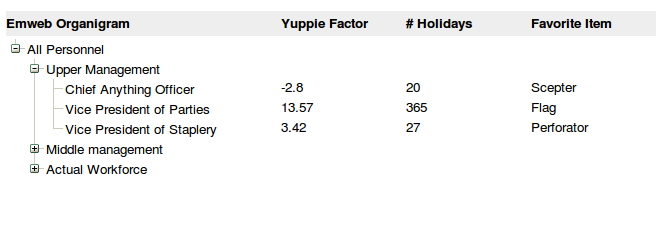
An example WTreeTable (default)
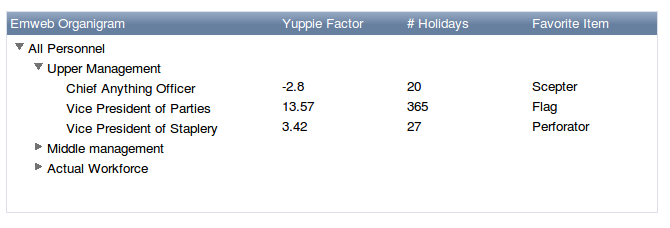
An example WTreeTable (polished)
- See Also:
-
Nested Class Summary
Nested classes/interfaces inherited from class eu.webtoolkit.jwt.WObject
WObject.FormData -
Constructor Summary
ConstructorsConstructorDescriptionCreates a new tree table.WTreeTable(WContainerWidget parentContainer) Creates a new tree table. -
Method Summary
Modifier and TypeMethodDescriptionvoidaddColumn(CharSequence header, WLength width) Adds an extra column.columnWidth(int column) Returns the column width for the given column.intReturns the number of columns in this table.Returns the header widget.getTree()Returns the tree that provides the data this table.Returns the tree root.header(int column) Returns the header for the given column.protected voidrender(EnumSet<RenderFlag> flags) Renders the widget.voidsetDisabled(boolean isDisabled) Sets whether the widget is disabled.voidsetTree(WTree root, CharSequence h) Sets the tree which provides the data for the tree table.voidsetTreeRoot(WTreeTableNode root, CharSequence h) Sets the tree root.Methods inherited from class eu.webtoolkit.jwt.WCompositeWidget
addStyleClass, boxBorder, boxPadding, callJavaScriptMember, doJavaScript, enableAjax, find, findById, getAttributeValue, getBaseZIndex, getChildren, getClearSides, getDecorationStyle, getFloatSide, getHeight, getId, getImplementation, getJavaScriptMember, getLineHeight, getMargin, getMaximumHeight, getMaximumWidth, getMinimumHeight, getMinimumWidth, getObjectName, getOffset, getPositionScheme, getScrollVisibilityMargin, getStyleClass, getTabIndex, getTakeImplementation, getToolTip, getVerticalAlignment, getVerticalAlignmentLength, getWidth, hasFocus, hasStyleClass, isCanReceiveFocus, isDisabled, isEnabled, isHidden, isHiddenKeepsGeometry, isInline, isLoaded, isPopup, isScrollVisibilityEnabled, isScrollVisible, isSetFirstFocus, isThemeStyleEnabled, isVisible, load, propagateSetEnabled, propagateSetVisible, refresh, remove, removeStyleClass, removeWidget, resize, scrollVisibilityChanged, setAttributeValue, setCanReceiveFocus, setClearSides, setDecorationStyle, setDeferredToolTip, setFloatSide, setFocus, setHidden, setHiddenKeepsGeometry, setId, setImplementation, setInline, setJavaScriptMember, setLineHeight, setMargin, setMaximumSize, setMinimumSize, setObjectName, setOffsets, setPopup, setPositionScheme, setScrollVisibilityEnabled, setScrollVisibilityMargin, setSelectable, setStyleClass, setTabIndex, setThemeStyleEnabled, setToolTip, setVerticalAlignmentMethods inherited from class eu.webtoolkit.jwt.WWidget
acceptDrops, acceptDrops, addCssRule, addCssRule, addJSignal, addStyleClass, animateHide, animateShow, createJavaScript, disable, dropEvent, enable, getDropTouch, getJsRef, getParent, hide, htmlText, isExposed, isGlobalWidget, isLayoutSizeAware, isRendered, layoutSizeChanged, needsRerender, positionAt, positionAt, removeFromParent, removeStyleClass, render, resize, scheduleRender, scheduleRender, scheduleRender, setClearSides, setDeferredToolTip, setFocus, setHeight, setHidden, setLayoutSizeAware, setMargin, setMargin, setMargin, setMargin, setMargin, setOffsets, setOffsets, setOffsets, setOffsets, setOffsets, setToolTip, setVerticalAlignment, setWidth, show, stopAcceptDrops, toggleStyleClass, toggleStyleClass, trMethods inherited from class eu.webtoolkit.jwt.WObject
setFormData
-
Constructor Details
-
WTreeTable
Creates a new tree table.The
getTreeRoot()isnull. The table should first be properly dimensioned usingaddColumn()calls, and then data usingsetTreeRoot(). -
WTreeTable
public WTreeTable()Creates a new tree table.
-
-
Method Details
-
addColumn
Adds an extra column.Add an extra column, specifying the column header and a column width. The extra columns are numbered from 1 as column 0 contains the tree itself. The header for column 0 (the tree itself) is specified in
setTreeRoot(), and the width of column 0 takes the remaining available width. -
getColumnCount
public int getColumnCount()Returns the number of columns in this table.Returns the number of columns in the table, including in the count column 0 (which contains the tree).
-
setTreeRoot
Sets the tree root.Sets the data for the tree table, and specify the header for the first column.
The initial
rootis nullptr. -
getTreeRoot
Returns the tree root. -
setTree
Sets the tree which provides the data for the tree table. -
getTree
Returns the tree that provides the data this table.- See Also:
-
columnWidth
Returns the column width for the given column.The width of the first column (with index 0), containing the tree, is implied by the width set for the table minus the width of all other columns.
-
header
Returns the header for the given column. -
getHeaderWidget
Returns the header widget.This is the widget that contains the column headers.
-
setDisabled
public void setDisabled(boolean isDisabled) Description copied from class:WWidgetSets whether the widget is disabled.Enables or disables the widget (including all its descendant widgets). setDisabled(false) will enable this widget and all descendant widgets that are not disabled. A widget is only enabled if it and all its ancestors in the widget tree are disabled.
Typically, a disabled form widget will not allow changing the value, and disabled widgets will not react to mouse click events.
- Overrides:
setDisabledin classWCompositeWidget- See Also:
-
render
Description copied from class:WWidgetRenders the widget.This function renders the widget (or an update for the widget), after this has been scheduled using
scheduleRender().The default implementation will render the widget by serializing changes to JavaScript and HTML. You may want to reimplement this widget if you have been postponing some of the layout / rendering implementation until the latest moment possible. In that case you should make sure you call the base implementation however.
- Overrides:
renderin classWCompositeWidget
-