Class WOverlayLoadingIndicator
This loading indicator uses a gray semi-transparent overlay to darken the window contents, and centers a loading icon (with some text).
Usage example:
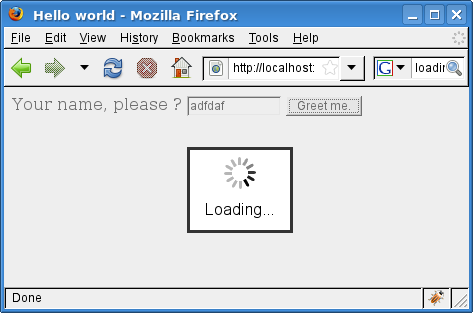
The overlay loading indicator
Note: For this loading indicator to render properly in IE, you need to reset the "body" margin to 0. Using the inline stylesheet, this could be done using:
CSS
This widget does not provide styling, and can be styled using inline or external CSS as appropriate.
i18n
The strings used in this class can be translated by overriding the default values for the following localization keys:
- Wt.WOverlayLoadingIndicator.Loading: Loading...
-
Nested Class Summary
Nested classes/interfaces inherited from class eu.webtoolkit.jwt.WObject
WObject.FormData -
Constructor Summary
ConstructorsConstructorDescriptionConstruct the loading indicator.WOverlayLoadingIndicator(String styleClass) Construct the loading indicator.WOverlayLoadingIndicator(String styleClass, String backgroundStyleClass) Construct the loading indicator.WOverlayLoadingIndicator(String styleClass, String backgroundStyleClass, String textStyleClass) Construct the loading indicator. -
Method Summary
Modifier and TypeMethodDescriptionvoidsetMessage(CharSequence text) Sets the message that you want to be displayed.Methods inherited from class eu.webtoolkit.jwt.WLoadingIndicator
removeMethods inherited from class eu.webtoolkit.jwt.WCompositeWidget
addStyleClass, boxBorder, boxPadding, callJavaScriptMember, doJavaScript, enableAjax, find, findById, getAttributeValue, getBaseZIndex, getChildren, getClearSides, getDecorationStyle, getFloatSide, getHeight, getId, getImplementation, getJavaScriptMember, getLineHeight, getMargin, getMaximumHeight, getMaximumWidth, getMinimumHeight, getMinimumWidth, getObjectName, getOffset, getPositionScheme, getScrollVisibilityMargin, getStyleClass, getTabIndex, getTakeImplementation, getToolTip, getVerticalAlignment, getVerticalAlignmentLength, getWidth, hasFocus, hasStyleClass, isCanReceiveFocus, isDisabled, isEnabled, isHidden, isHiddenKeepsGeometry, isInline, isLoaded, isPopup, isScrollVisibilityEnabled, isScrollVisible, isSetFirstFocus, isThemeStyleEnabled, isVisible, load, propagateSetEnabled, propagateSetVisible, refresh, removeStyleClass, removeWidget, render, resize, scrollVisibilityChanged, setAttributeValue, setCanReceiveFocus, setClearSides, setDecorationStyle, setDeferredToolTip, setDisabled, setFloatSide, setFocus, setHidden, setHiddenKeepsGeometry, setId, setImplementation, setInline, setJavaScriptMember, setLineHeight, setMargin, setMaximumSize, setMinimumSize, setObjectName, setOffsets, setPopup, setPositionScheme, setScrollVisibilityEnabled, setScrollVisibilityMargin, setSelectable, setStyleClass, setTabIndex, setThemeStyleEnabled, setToolTip, setVerticalAlignmentMethods inherited from class eu.webtoolkit.jwt.WWidget
acceptDrops, acceptDrops, addCssRule, addCssRule, addJSignal, addStyleClass, animateHide, animateShow, createJavaScript, disable, dropEvent, enable, getDropTouch, getJsRef, getParent, hide, htmlText, isExposed, isGlobalWidget, isLayoutSizeAware, isRendered, layoutSizeChanged, needsRerender, positionAt, positionAt, removeFromParent, removeStyleClass, render, resize, scheduleRender, scheduleRender, scheduleRender, setClearSides, setDeferredToolTip, setFocus, setHeight, setHidden, setLayoutSizeAware, setMargin, setMargin, setMargin, setMargin, setMargin, setOffsets, setOffsets, setOffsets, setOffsets, setOffsets, setToolTip, setVerticalAlignment, setWidth, show, stopAcceptDrops, toggleStyleClass, toggleStyleClass, trMethods inherited from class eu.webtoolkit.jwt.WObject
setFormData
-
Constructor Details
-
WOverlayLoadingIndicator
public WOverlayLoadingIndicator(String styleClass, String backgroundStyleClass, String textStyleClass) Construct the loading indicator.- Parameters:
styleClass- the style class for the central boxbackgroundStyleClass- the style class for the "background" part of the indicatortextStyleClass- the style class for the text that is displayedNote: if styleClass is not set, the central box gets the CSS style elements
 background: white;
 border: 3px solid #333333;
 z-index: 10001; visibility: visible;
 position: absolute; left: 50%; top: 50%;
 margin-left: -50px; margin-top: -40px;
 width: 100px; height: 80px;
 font-family: arial,sans-serif;
 text-align: center
Note: if backgroundStyleClass is not set, the background gets the CSS style elements
 background: #DDDDDD;
 height: 100%; width: 100%;
 top: 0px; left: 0px;
 z-index: 10000;
 -moz-background-clip: -moz-initial;
 -moz-background-origin: -moz-initial;
 -moz-background-inline-policy: -moz-initial;
 opacity: 0.5; filter: alpha(opacity=50); -moz-opacity:0.5;
 position: absolute;
-
WOverlayLoadingIndicator
public WOverlayLoadingIndicator()Construct the loading indicator.Calls
this("", "", "") -
WOverlayLoadingIndicator
Construct the loading indicator.Calls
this(styleClass, "", "") -
WOverlayLoadingIndicator
Construct the loading indicator.
-
-
Method Details
-
setMessage
Description copied from class:WLoadingIndicatorSets the message that you want to be displayed.If the indicator is capable of displaying a text message, then you should reimplement this method to allow this message to be modified.
- Specified by:
setMessagein classWLoadingIndicator
-