Package eu.webtoolkit.jwt
Class WGroupBox
A widget which group widgets into a frame with a title.
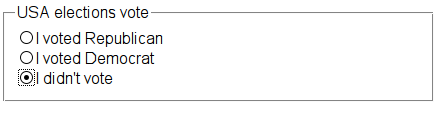
This is typically used in a form to group certain form elements together.
Usage example:
 enum Vote { Republican , Democrat , NoVote };

 // use a group box as widget container for 3 radio buttons, with a title
 WGroupBox container = new WGroupBox("USA elections vote");

 // use a button group to logically group the 3 options
 WButtonGroup group = new WButtonGroup(this);

 WRadioButton button;
 button = new WRadioButton("I voted Republican", container);
 new WBreak(container);
 group.addButton(button, Vote.Republican.ordinal());

 button = new WRadioButton("I voted Democrat", container);
 new WBreak(container);
 group.addButton(button, Vote.Democrate.ordinal());

 button = new WRadioButton("I didn't vote", container);
 new WBreak(container);
 group.addButton(button, Vote.NoVote.ordinal());

 group.setCheckedButton(group.button(Vote.NoVote.ordinal()));
Like WContainerWidget, WGroupBox is by default displayed as a block.
WGroupBox example
CSS
The widget corresponds to the HTML <fieldset> tag, and the title in a
nested <legend> tag. This widget does not provide styling, and can be styled
using inline or external CSS as appropriate.
-
Nested Class Summary
Nested classes/interfaces inherited from class eu.webtoolkit.jwt.WObject
WObject.FormData -
Field Summary
Fields inherited from class eu.webtoolkit.jwt.WInteractWidget
dragTouchEndSlot_, dragTouchSlot_ -
Constructor Summary
ConstructorsConstructorDescriptionCreates a groupbox with empty title.WGroupBox(WContainerWidget parentContainer) Creates a groupbox with empty title.WGroupBox(CharSequence title) Creates a groupbox with given title message.WGroupBox(CharSequence title, WContainerWidget parentContainer) Creates a groupbox with given title message. -
Method Summary
Modifier and TypeMethodDescriptiongetTitle()Returns the title.voidrefresh()Refresh the widget.voidsetTitle(CharSequence title) Sets the title.Methods inherited from class eu.webtoolkit.jwt.WContainerWidget
addWidget, clear, createDomElement, getContentAlignment, getCount, getDomChanges, getIndexOf, getLayout, getPadding, getScrollLeft, getScrollTop, getWidget, insertBefore, insertWidget, isGlobalUnfocussed, isList, isOrderedList, isUnorderedList, iterateChildren, parentResized, remove, removeWidget, scrolled, setContentAlignment, setContentAlignment, setFormData, setGlobalUnfocused, setLayout, setList, setList, setOverflow, setOverflow, setOverflow, setPadding, setPadding, setPaddingMethods inherited from class eu.webtoolkit.jwt.WInteractWidget
clicked, doubleClicked, enterPressed, escapePressed, gestureChanged, gestureEnded, gestureStarted, getMouseOverDelay, isEnabled, keyPressed, keyWentDown, keyWentUp, load, mouseDragged, mouseMoved, mouseWentDown, mouseWentOut, mouseWentOver, mouseWentUp, mouseWheel, propagateSetEnabled, setDraggable, setDraggable, setDraggable, setDraggable, setMouseOverDelay, setPopup, touchEnded, touchMoved, touchStarted, unsetDraggableMethods inherited from class eu.webtoolkit.jwt.WWebWidget
addStyleClass, beingDeleted, blurred, callJavaScriptMember, childrenChanged, doJavaScript, enableAjax, escapeText, escapeText, escapeText, escapeText, find, findById, focussed, getAttributeValue, getBaseZIndex, getChildren, getClearSides, getDecorationStyle, getFloatSide, getHeight, getHtmlTagName, getId, getJavaScriptMember, getLineHeight, getMargin, getMaximumHeight, getMaximumWidth, getMinimumHeight, getMinimumWidth, getOffset, getPositionScheme, getScrollVisibilityMargin, getStyleClass, getTabIndex, getToolTip, getVerticalAlignment, getVerticalAlignmentLength, getWidth, hasFocus, hasStyleClass, isCanReceiveFocus, isDisabled, isHidden, isHiddenKeepsGeometry, isInline, isLoaded, isPopup, isRendered, isScrollVisibilityEnabled, isScrollVisible, isSetFirstFocus, isThemeStyleEnabled, isVisible, jsStringLiteral, jsStringLiteral, manageWidget, parentResized, propagateSetVisible, removeScript, removeStyleClass, render, resize, scrollVisibilityChanged, setAttributeValue, setBaseZIndex, setCanReceiveFocus, setClearSides, setDecorationStyle, setDeferredToolTip, setDisabled, setFlexBox, setFloatSide, setFocus, setHidden, setHiddenKeepsGeometry, setHtmlTagName, setId, setInline, setJavaScriptMember, setLineHeight, setLoadLaterWhenInvisible, setMargin, setMaximumSize, setMinimumSize, setObjectName, setOffsets, setParentWidget, setPositionScheme, setScrollVisibilityEnabled, setScrollVisibilityMargin, setSelectable, setStyleClass, setTabIndex, setThemeStyleEnabled, setToolTip, setVerticalAlignment, unescapeText, updateSignalConnection, voidEventSignal, widgetAdded, widgetRemovedMethods inherited from class eu.webtoolkit.jwt.WWidget
acceptDrops, acceptDrops, addCssRule, addCssRule, addJSignal, addStyleClass, animateHide, animateShow, boxBorder, boxPadding, createJavaScript, disable, dropEvent, enable, getDropTouch, getJsRef, getParent, hide, htmlText, isExposed, isGlobalWidget, isLayoutSizeAware, layoutSizeChanged, needsRerender, positionAt, positionAt, removeFromParent, removeStyleClass, render, resize, scheduleRender, scheduleRender, scheduleRender, setClearSides, setDeferredToolTip, setFocus, setHeight, setHidden, setLayoutSizeAware, setMargin, setMargin, setMargin, setMargin, setMargin, setOffsets, setOffsets, setOffsets, setOffsets, setOffsets, setToolTip, setVerticalAlignment, setWidth, show, stopAcceptDrops, toggleStyleClass, toggleStyleClass, trMethods inherited from class eu.webtoolkit.jwt.WObject
getObjectName
-
Constructor Details
-
WGroupBox
Creates a groupbox with empty title. -
WGroupBox
public WGroupBox()Creates a groupbox with empty title. -
WGroupBox
Creates a groupbox with given title message. -
WGroupBox
Creates a groupbox with given title message.
-
-
Method Details
-
getTitle
Returns the title. -
setTitle
Sets the title. -
refresh
public void refresh()Description copied from class:WWidgetRefresh the widget.The refresh method is invoked when the locale is changed using
WApplication#setLocale()or when the user hit the refresh button.The widget must actualize its contents in response.
Note: This does not rerender the widget! Calling
refresh()usually does not have any effect (unless you've reimplementedrefresh()to attach to it an effect).- Overrides:
refreshin classWWebWidget
-