Class WCalendar
The calendar provides navigation by month and year, and indicates the current day.
You can listen for single click or double click events on a calendar cell using the clicked() and activated() methods.
The calendar may be configured to allow selection of single or multiple days using setSelectionMode(), and you may listen for
changes in the selection using the selectionChanged()
signals. Selection can also be entirely disabled in which case you can implement your own
selection handling by listening for cell click events.
Cell rendering may be customized by reimplementing renderCell().
Internationalization is provided by the internationalization features of the WDate class.
Here is a snapshot, taken on 19/01/2010 (shown as today), and 14/01/2010 currently selected.
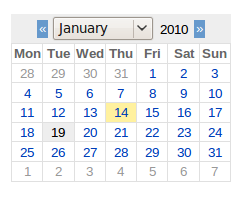
WCalendar with default look | 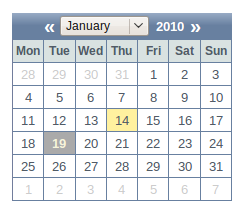
WCalendar with polished look |
-
Nested Class Summary
Nested classes/interfaces inherited from class eu.webtoolkit.jwt.WObject
WObject.FormData -
Constructor Summary
ConstructorsConstructorDescriptionCreates a new calendar.WCalendar(WContainerWidget parentContainer) Creates a new calendar. -
Method Summary
Modifier and TypeMethodDescriptionSignal emitted when the user double-clicks a date.voidBrowses to a date.voidBrowses to the next month.voidBrowses to the same month in the next year.voidBrowses to the previous month.voidBrowses to the same month in the previous year.voidClears the current selection.clicked()Signal emitted when the user clicks a date.Signal emitted when the current month is changed.protected voidProgresses to an Ajax-enabled widget.Returns the bottom date of the valid range.intReturns the current month displayed.intReturns the current year displayed.Returns the horizontal header format.Returns the current selection.getTop()Returns the top date of the valid range.protected booleanisSelected(WDate d) Returns whether a date is selected.voidload()Loads content just before the widget is used.protected voidrender(EnumSet<RenderFlag> flags) Renders the widget.protected WWidgetrenderCell(WWidget widget, WDate date) Creates or updates a widget that renders a cell.voidSelects a date.voidSelects multiple dates.Signal emitted when the user changes the selection.voidSets the bottom of the valid date range.voidsetFirstDayOfWeek(int dayOfWeek) Sets the first day of the week.voidSets the horizontal header format.voidSets the selection mode.voidsetSingleClickSelect(boolean single) Configures the calendar to use single click for activation.voidSets the top of the valid date range.Methods inherited from class eu.webtoolkit.jwt.WCompositeWidget
addStyleClass, boxBorder, boxPadding, callJavaScriptMember, doJavaScript, find, findById, getAttributeValue, getBaseZIndex, getChildren, getClearSides, getDecorationStyle, getFloatSide, getHeight, getId, getImplementation, getJavaScriptMember, getLineHeight, getMargin, getMaximumHeight, getMaximumWidth, getMinimumHeight, getMinimumWidth, getObjectName, getOffset, getPositionScheme, getScrollVisibilityMargin, getStyleClass, getTabIndex, getTakeImplementation, getToolTip, getVerticalAlignment, getVerticalAlignmentLength, getWidth, hasFocus, hasStyleClass, isCanReceiveFocus, isDisabled, isEnabled, isHidden, isHiddenKeepsGeometry, isInline, isLoaded, isPopup, isScrollVisibilityEnabled, isScrollVisible, isSetFirstFocus, isThemeStyleEnabled, isVisible, propagateSetEnabled, propagateSetVisible, refresh, remove, removeStyleClass, removeWidget, resize, scrollVisibilityChanged, setAttributeValue, setCanReceiveFocus, setClearSides, setDecorationStyle, setDeferredToolTip, setDisabled, setFloatSide, setFocus, setHidden, setHiddenKeepsGeometry, setId, setImplementation, setInline, setJavaScriptMember, setLineHeight, setMargin, setMaximumSize, setMinimumSize, setObjectName, setOffsets, setPopup, setPositionScheme, setScrollVisibilityEnabled, setScrollVisibilityMargin, setSelectable, setStyleClass, setTabIndex, setThemeStyleEnabled, setToolTip, setVerticalAlignmentMethods inherited from class eu.webtoolkit.jwt.WWidget
acceptDrops, acceptDrops, addCssRule, addCssRule, addJSignal, addStyleClass, animateHide, animateShow, createJavaScript, disable, dropEvent, enable, getDropTouch, getJsRef, getParent, hide, htmlText, isExposed, isGlobalWidget, isLayoutSizeAware, isRendered, layoutSizeChanged, needsRerender, positionAt, positionAt, removeFromParent, removeStyleClass, render, resize, scheduleRender, scheduleRender, scheduleRender, setClearSides, setDeferredToolTip, setFocus, setHeight, setHidden, setLayoutSizeAware, setMargin, setMargin, setMargin, setMargin, setMargin, setOffsets, setOffsets, setOffsets, setOffsets, setOffsets, setToolTip, setVerticalAlignment, setWidth, show, stopAcceptDrops, toggleStyleClass, toggleStyleClass, trMethods inherited from class eu.webtoolkit.jwt.WObject
setFormData
-
Constructor Details
-
WCalendar
Creates a new calendar.Constructs a new calendar with English day/month names. The calendar shows the current day, and has an empty selection.
-
WCalendar
public WCalendar()Creates a new calendar.
-
-
Method Details
-
setSelectionMode
Sets the selection mode.The default selection mode is SingleSelection.
-
browseToPreviousYear
public void browseToPreviousYear()Browses to the same month in the previous year.Displays the same month in the previous year. This does not affect the selection.
This will emit the
currentPageChanged()singal. -
browseToPreviousMonth
public void browseToPreviousMonth()Browses to the previous month.Displays the previous month. This does not affect the selection.
This will emit the
currentPageChanged()singal. -
browseToNextYear
public void browseToNextYear()Browses to the same month in the next year.Displays the same month in the next year. This does not change the current selection.
This will emit the
currentPageChanged()singal. -
browseToNextMonth
public void browseToNextMonth()Browses to the next month.Displays the next month. This does not change the current selection.
This will emit the
currentPageChanged()singal. -
browseTo
Browses to a date.Displays the month which contains the given date. This does not change the current selection.
This will emit the
currentPageChanged()signal if another month is displayed. -
getCurrentMonth
public int getCurrentMonth()Returns the current month displayed.Returns the month (1-12) that is currently displayed.
-
getCurrentYear
public int getCurrentYear()Returns the current year displayed.Returns the year that is currently displayed.
-
clearSelection
public void clearSelection()Clears the current selection.Clears the current selection. Will result in a
getSelection()that is empty(). -
select
Selects a date.Select one date. Both in single or multiple selection mode, this results in a
getSelection()that contains exactly one date. -
select
Selects multiple dates.Select multiple dates. In multiple selection mode, this results in a
getSelection()that contains exactly the given dates. In single selection mode, at most one date is set. -
setHorizontalHeaderFormat
Sets the horizontal header format.The default horizontal header format is
CalendarHeaderFormat.ShortDayNames. -
getHorizontalHeaderFormat
Returns the horizontal header format. -
setFirstDayOfWeek
public void setFirstDayOfWeek(int dayOfWeek) Sets the first day of the week.Possible values are 1 to 7. The default value is 1 ("Monday").
-
getSelection
Returns the current selection.Returns the set of dates currently selected. In single selection mode, this set contains 0 or 1 dates.
-
selectionChanged
Signal emitted when the user changes the selection.Emitted after the user has changed the current selection.
-
activated
Signal emitted when the user double-clicks a date.You may want to connect to this signal to treat a double click as the selection of a date.
-
clicked
Signal emitted when the user clicks a date.You may want to connect to this signal if you want to provide a custom selection handling.
-
currentPageChanged
Signal emitted when the current month is changed.The method is emitted both when the change is done through the user interface or via the public API. The two parameters are respectively the new year and month.
-
setSingleClickSelect
public void setSingleClickSelect(boolean single) Configures the calendar to use single click for activation.By default, double click will trigger activate(). Use this method if you want a single click to trigger activate() (and the now deprecated selected() method). This only applies to a single-selection calendar.
If selectionMode() is set to SingleSelection, this will cause the selection to change on a single click instead of a double click.
Instead of enabling single click, you can also listen to the
clicked()signal to process a single click.- See Also:
-
setBottom
Sets the bottom of the valid date range.The default bottom is null.
-
getBottom
Returns the bottom date of the valid range. -
setTop
Sets the top of the valid date range.The default top is null.
-
getTop
Returns the top date of the valid range. -
load
public void load()Description copied from class:WWidgetLoads content just before the widget is used.This function is called when a widget is inserted in the widget hierarchy. Widgets that get inserted in the widget hierarchy will be rendered. Visible widgets are rendered immediately, and invisible widgets in the back-ground (or not for a plain HTML session). This method is called when the widget is directly or indirectly inserted into the widget tree.
The default implementation simply propagates the load signal to its children. You may want to override this method to delay loading of resource-intensive contents.
During the life-time of a widget, this method may be called multiple times, so you should make sure that you do a deferred initialization only once.
- Overrides:
loadin classWCompositeWidget
-
render
Description copied from class:WWidgetRenders the widget.This function renders the widget (or an update for the widget), after this has been scheduled using
scheduleRender().The default implementation will render the widget by serializing changes to JavaScript and HTML. You may want to reimplement this widget if you have been postponing some of the layout / rendering implementation until the latest moment possible. In that case you should make sure you call the base implementation however.
- Overrides:
renderin classWCompositeWidget
-
renderCell
Creates or updates a widget that renders a cell.The default implementation creates a
WTextYou may want to reimplement this method if you wish to customize how a cell is rendered. When
widgetisnull, a new widget should be created and returned. Otherwise, you may either modify the passedwidget, or return a new widget. If you return a new widget, the prevoius widget will be deleted. -
isSelected
Returns whether a date is selected.This is a convenience method that can be used when reimplementing
renderCell(). -
enableAjax
protected void enableAjax()Description copied from class:WWidgetProgresses to an Ajax-enabled widget.This method is called when the progressive bootstrap method is used, and support for AJAX has been detected. The default behavior will upgrade the widget's event handling to use AJAX instead of full page reloads, and propagate the call to its children.
You may want to reimplement this method if you want to make changes to widget when AJAX is enabled. You should always call the base implementation.
- Overrides:
enableAjaxin classWCompositeWidget- See Also:
-